
PLM, CAD, Warehouse & Production Systems
DigiPro System Manufacturing Execution System

Real-Time Production Control,
Without Replacing a Single Machine

DigiPro System connects your existing machines through a small wireless device that attaches to a moving part. From there you get live work order status, a record of every machine stoppage, and operator output you can actually verify, on a phone or a desktop.
Authorized Partner
Official Distributor
Implementation Partner
Machine Connected
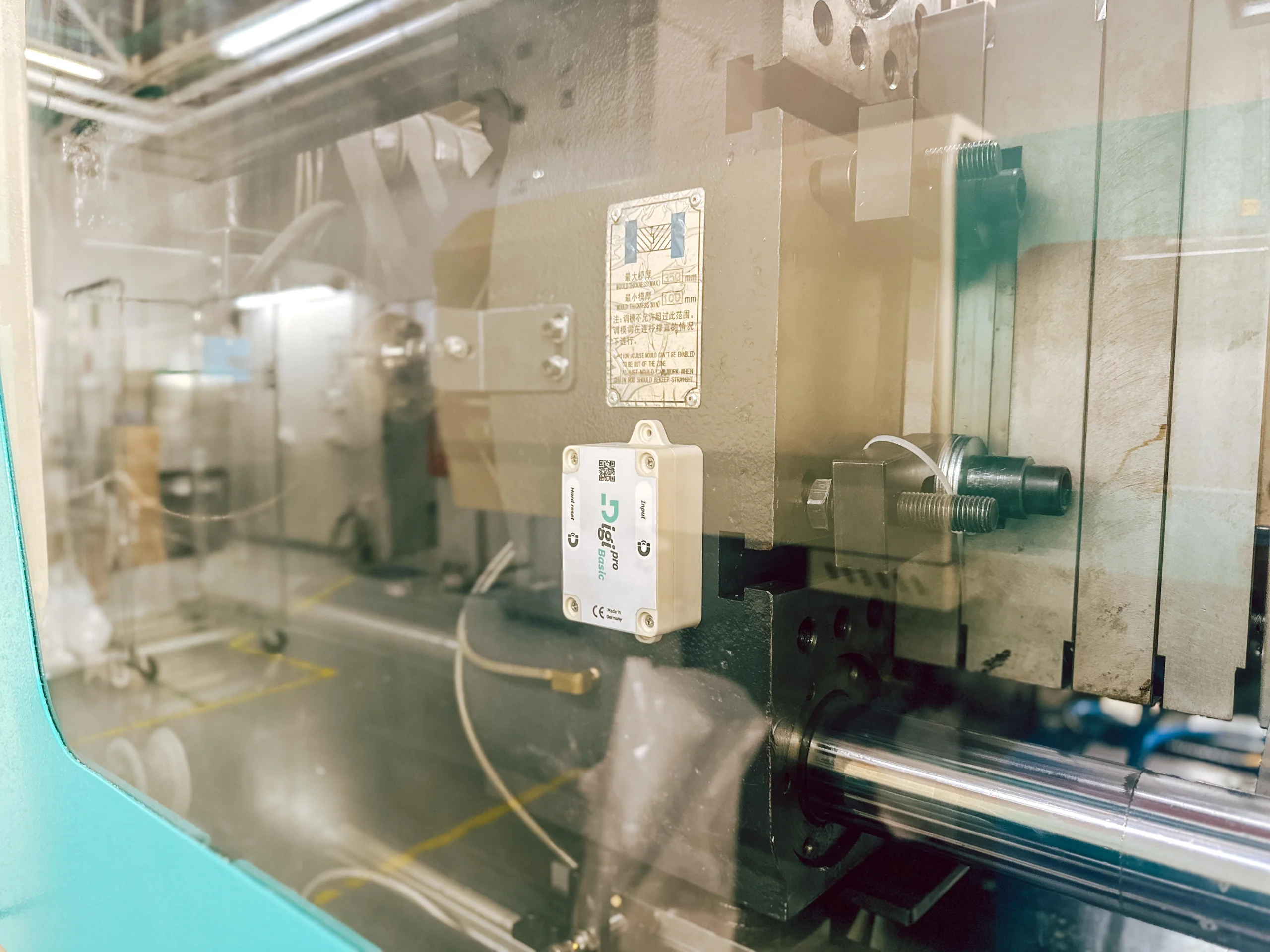
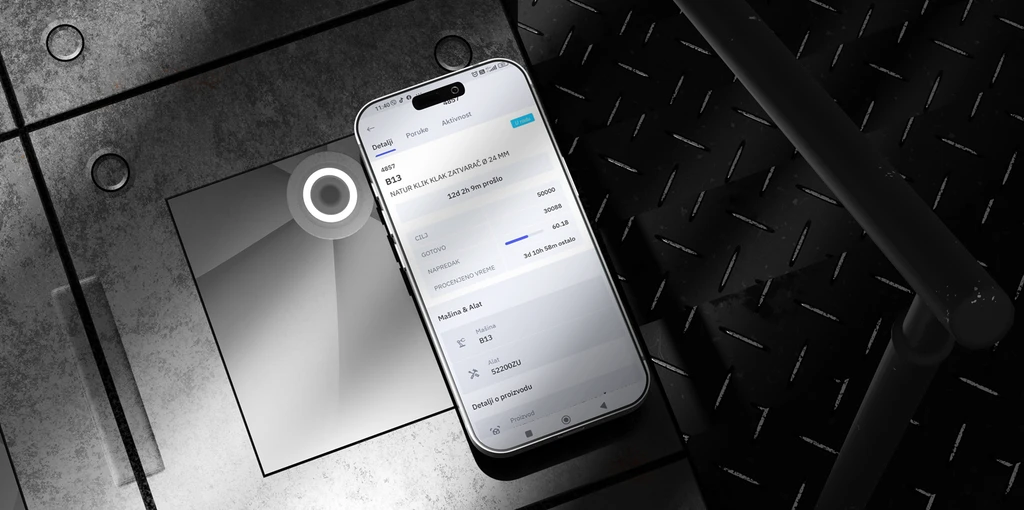
DigiPro wireless device mounted on a production machine
Adhesive Wireless Mount
No modification to the machine itself
Retrofit Ready
Works on the machines you already run
Four Step Setup
Device, software, app, and training
Live Analytics
On the phone and on the desktop
Why DigiPro Exists

Built Inside a Factory,
Not a Software Office

Most production software is designed by people who have never run a shift. DigiPro started from the opposite direction, as an answer to problems its own developers were living with every day.

DigiPro System was developed by the team behind a family manufacturing company that has been running its own production facility for more than thirty years. Over that time they worked through most of the problems a growing plant encounters, and when they went looking for a system to manage those processes properly, they concluded that nothing on the market actually did the job.

So they built one, together with technical specialists, around the requirements of a real production floor rather than a specification written from the outside. The result is a system designed for precise production management, employee performance tracking, and practical support for the people doing the work.

Developed and supported in Serbia, by a manufacturer for manufacturers
01
The Challenge

Output varied from shift to shift

The same machines and the same orders produced different results depending on who was on duty. Everyone could feel the difference, but nobody could say precisely how large it was or where it came from.

What Changes

Consistent efficiency across every shift

The system measures the same way regardless of who is working, so differences between shifts become visible, comparable, and something you can act on.

02
The Challenge

Reports arrived late and answered the wrong question

By the time the numbers were compiled, the shift they described was already over. Decisions were made on the basis of what happened last week rather than what is happening on the floor right now.

What Changes

Processes recorded in real time

Because the record is created as the work happens, a report for any period is available immediately rather than assembled afterwards.

03
The Challenge

Critical processes depended on specific people

Knowledge about tool changes, settings, and the fixes that actually work lived in the heads of a few experienced operators. When they were unavailable, the line slowed down and new hires took months to become useful.

What Changes

A knowledge base that makes the team self-sufficient

Procedures, tool setup instructions, and video guidance sit inside the system, tied to the work order. The company owns the knowledge instead of individuals holding it.

04
The Challenge

Keeping control meant adding supervisors

As the operation grew, the only available way to maintain oversight was to put more people in charge of watching other people. Cost went up without production going up with it.

What Changes

Digital monitoring and process automation

The system assigns work, records progress, and flags stoppages on its own, which keeps control and quality in place with fewer shift supervisors on the floor.

Implementation in Just 4 Steps

Quick and Easy Implementation,
Analytics Available Immediately

There is no rewiring, no controller integration project, and no waiting for a new machine budget. The device goes on, the software goes in, and the data starts arriving.
1 Step One
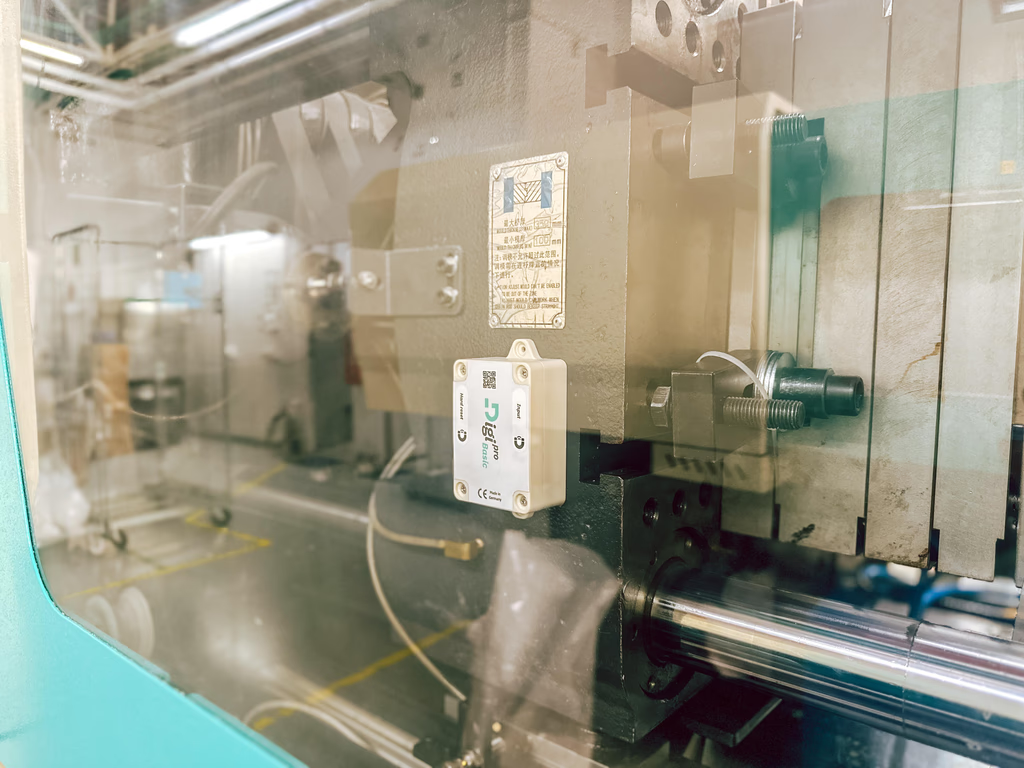
DigiPro wireless device being attached to the moving part of a machine Hardware

A wireless device that is easy to install

Quick installation with no additional adjustment to your systems. The device is wireless, and you simply attach it to the moving part of the machine.
2 Step Two
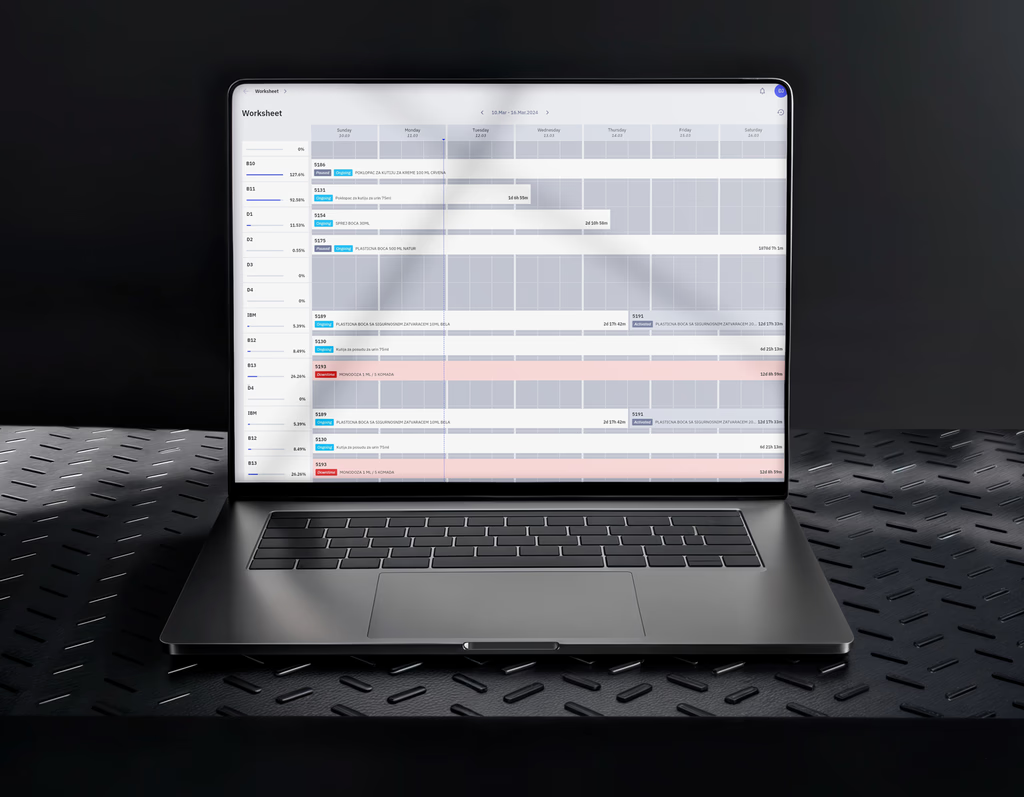
DigiPro software installed and connected to production machines Software

Software installation

The system automatically assigns work orders to available operators and notifies them of any machine downtime. It tracks how long each order takes, records every stoppage and its duration, and includes the orders related to tool replacement.
3 Step Three
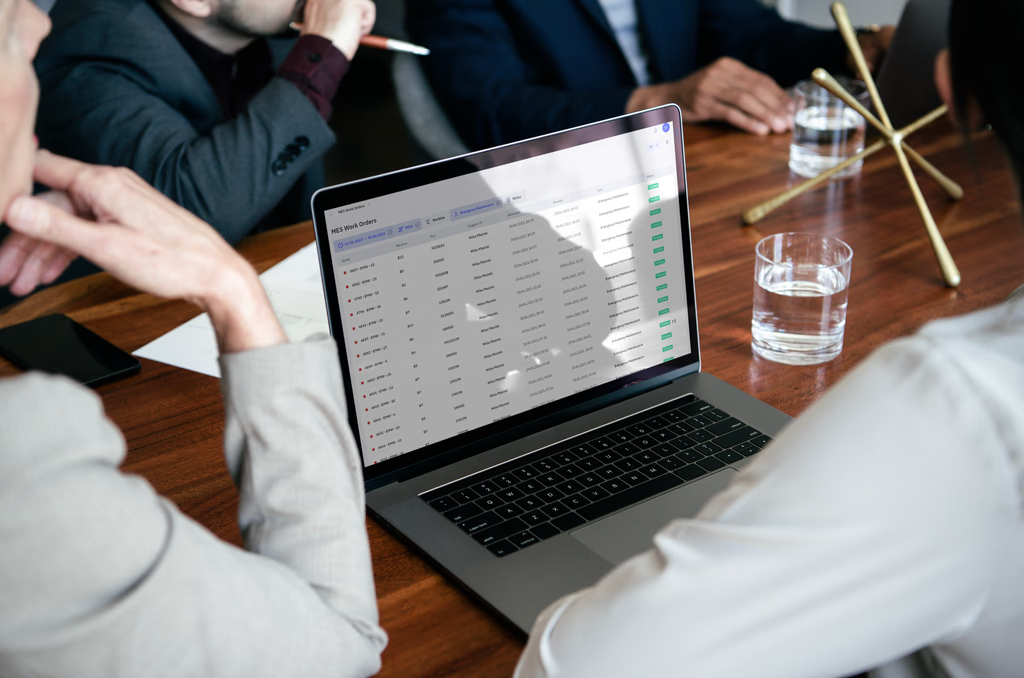
DigiPro application installed on desktop and mobile devices Application

Application installation

Installing the application automatically gives users a detailed view of system activity, technical data, reports, and the knowledge base they rely on for daily work and support.
4 Step Four
DigiPro team guiding users through the system after installation Onboarding

Onboarding and enablement

Our team guides you through every step and makes sure the system keeps delivering results in the processes you set out to improve, rather than quietly falling out of use after go-live.

Analytics from the first shift, not the first quarter

Nothing here depends on a machine budget, a rewiring window, or an integration project. Once the device is mounted, the data starts.

Request a Free Analysis
See It in Action

Three Short Videos,
Filmed on a Real Production Floor

Not animated product marketing. The device on an actual machine, the knowledge base in daily use, and the person who built the system explaining why.

How the device connects your machines

The wireless unit going onto a machine and the data it starts producing. This is the part that decides whether production monitoring is feasible in a plant with a mixed machine park.

The knowledge base in practice

How an operator finds the instruction they need, tied to the order they are running, without waiting for a specialist.

Why we built it in the first place

The problems that led a manufacturing company to develop its own production system rather than buy one.

Đorđe Jovanović, Uniplast
Videos are narrated in Serbian. Contact us for an English walkthrough.
On the Shop Floor

The Operator Gets Instructions,
Not Paperwork

The mobile app replaces the printed job sheet and the walk to the supervisor. Everything needed to run the current order sits on one screen, and it updates itself.
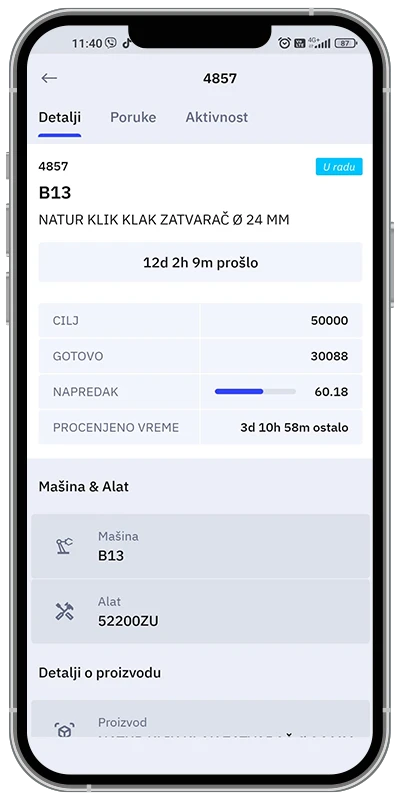
DigiPro mobile app showing work order details
Assigned automatically
To operators who are free
Updates as work happens
No refresh, no reporting back

One screen for the order in front of them

When an order is assigned, the operator does not have to find out what it involves. The app opens on the work order they are actually running, with the target quantity, how far along it is, and what equipment it needs.

The system assigns orders to operators who are free and notifies them of any machine stoppage, which removes a large part of the coordination that a shift supervisor would otherwise be doing by walking the floor.

Target quantity for the order
How much is required, visible without asking anyone
Completion percentage and expected finish time
Progress to this moment, and when the order should be done
Machine, tool, and product details
The exact setup this order runs on, tied to the order itself
Live View

The state of production, on the phone in your pocket

The same app gives management a running picture of the plant without walking into it. Three numbers answer the question that usually takes a phone call and ten minutes.

Active Work Orders
Active Operators
Active Machines
DigiPro real-time production overview
Desktop Application

Management Sees the Same Reality
the Floor Is Working In

Not a summary compiled after the shift. The desktop application reads from the same live record the operators are creating, which is why the two never disagree.

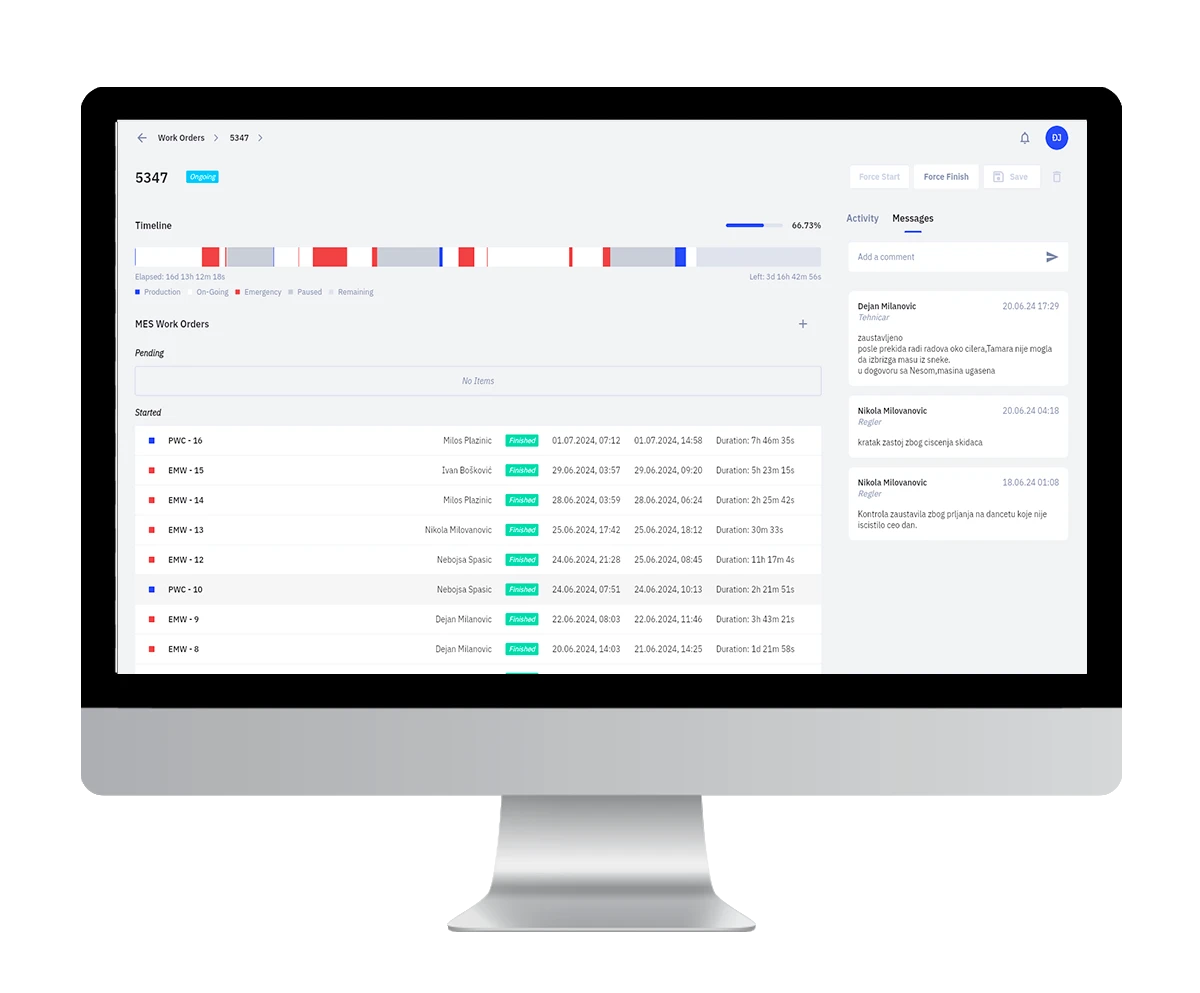
Every work order, in one live list

The starting screen is the one question a production manager asks all day: what is running right now, and where does it stand? Orders appear as they are assigned and move as the work moves.

From there you open any single order and see the full activity trail behind it, including the stoppages that shaped how long it actually took.
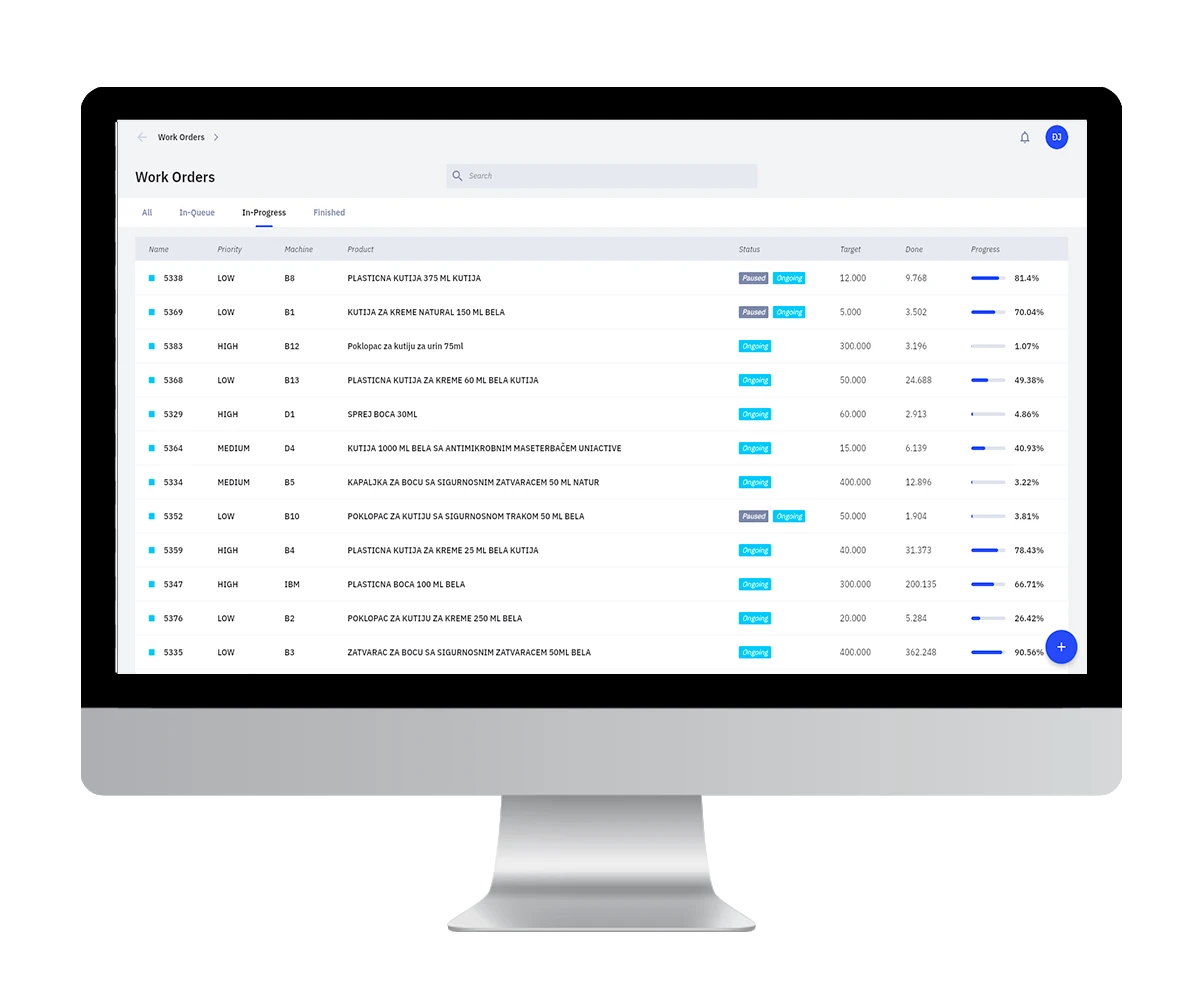
Status of every order without calling the floor
Reports available immediately, for any period you choose
Orders adjust to real conditions, including unplanned stoppages
Work Orders, Real Time
DigiPro desktop application showing the real-time work order list
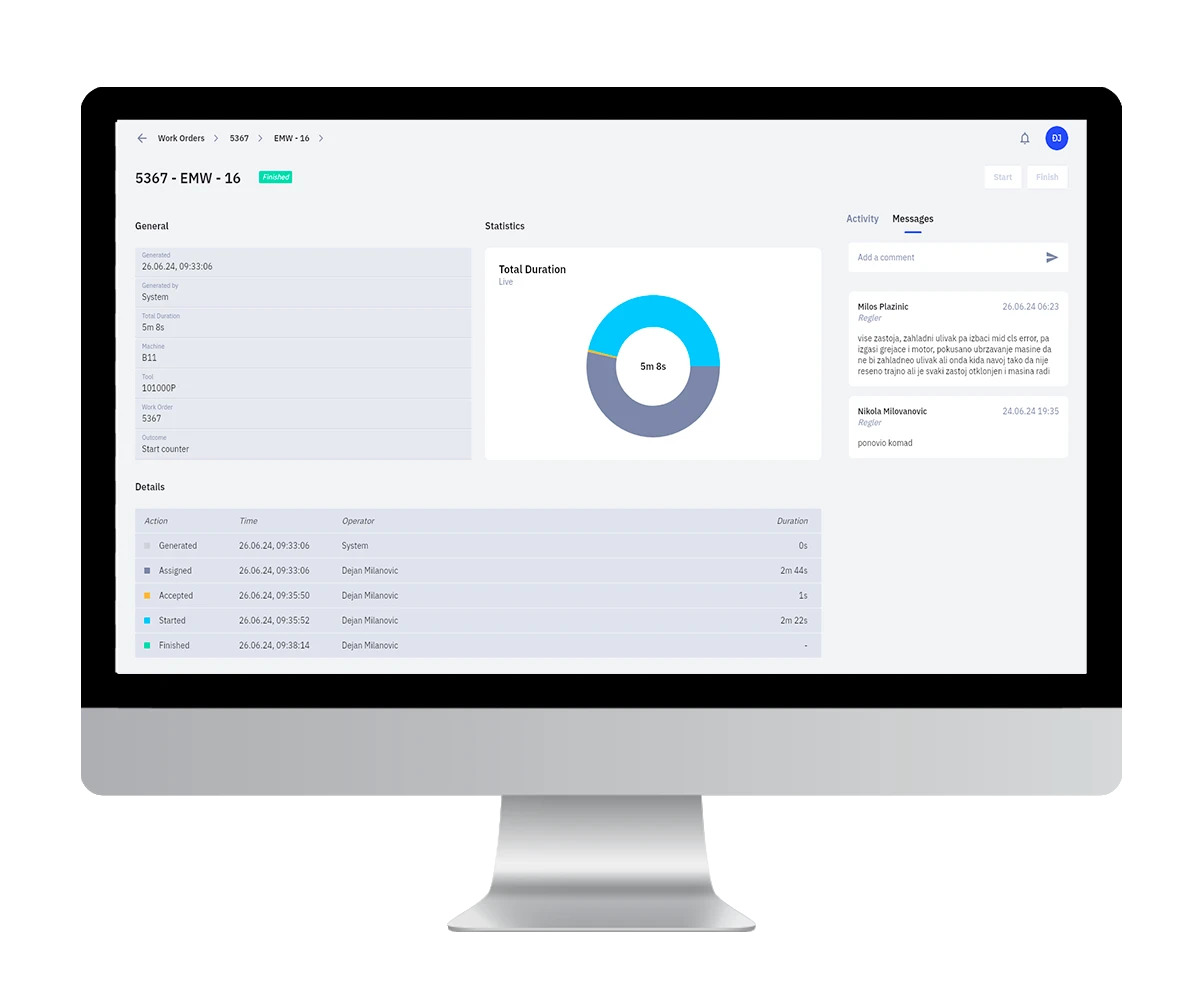
Order Detail
DigiPro work order detail with full activity history
Full Order Detail

Every activity recorded against a single work order, so the time it took is explained rather than just measured.
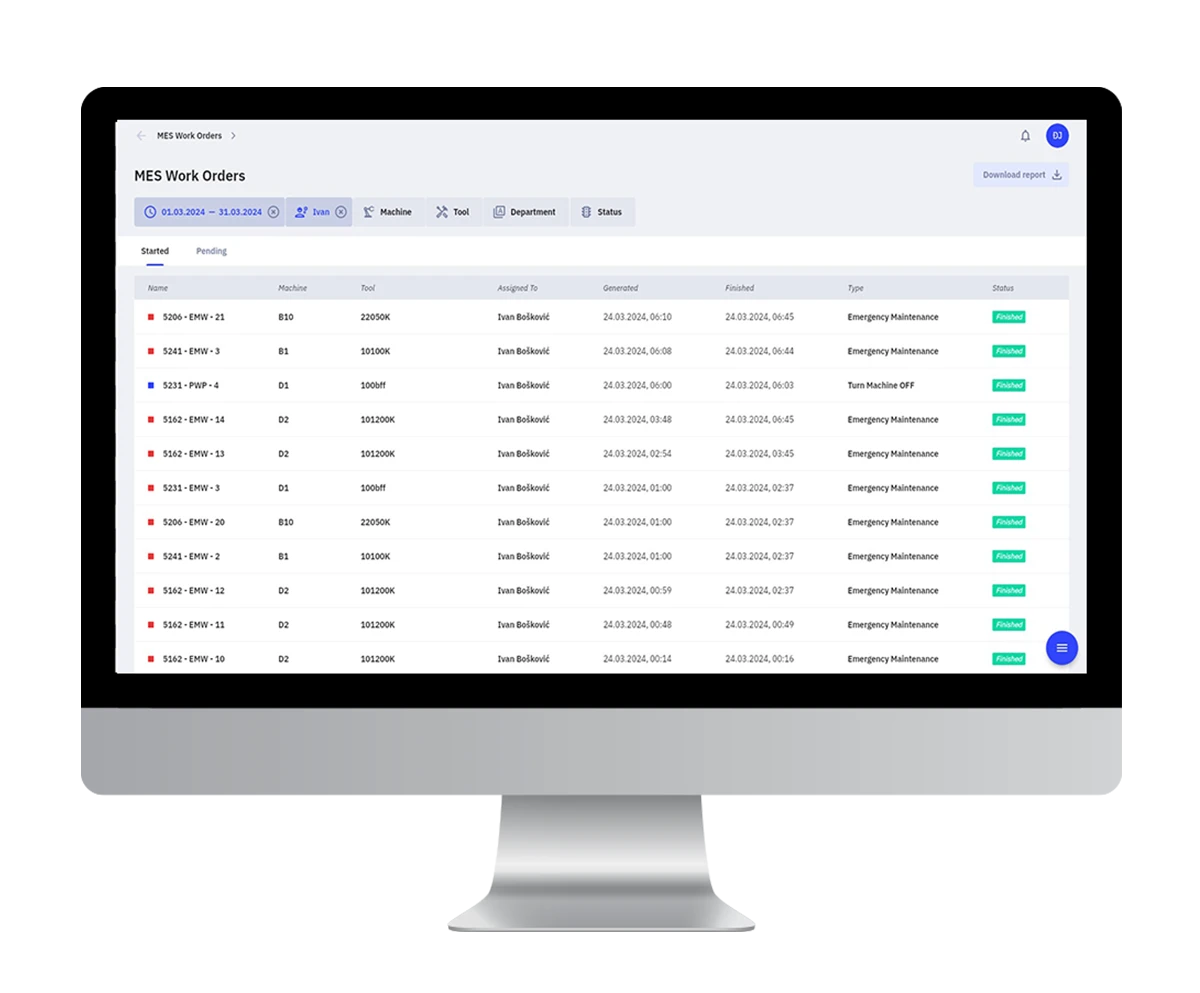
Machine Downtime
DigiPro machine downtime breakdown by machine and duration
Every Stoppage, Itemized

Each machine stoppage recorded with its duration, which turns downtime from a vague complaint into a ranked list you can work through.
Operator Efficiency
DigiPro operator efficiency overview by activity
Efficiency by Operator

Activity broken down per operator, measured identically across shifts. It is the basis for paying on real performance rather than on impression.
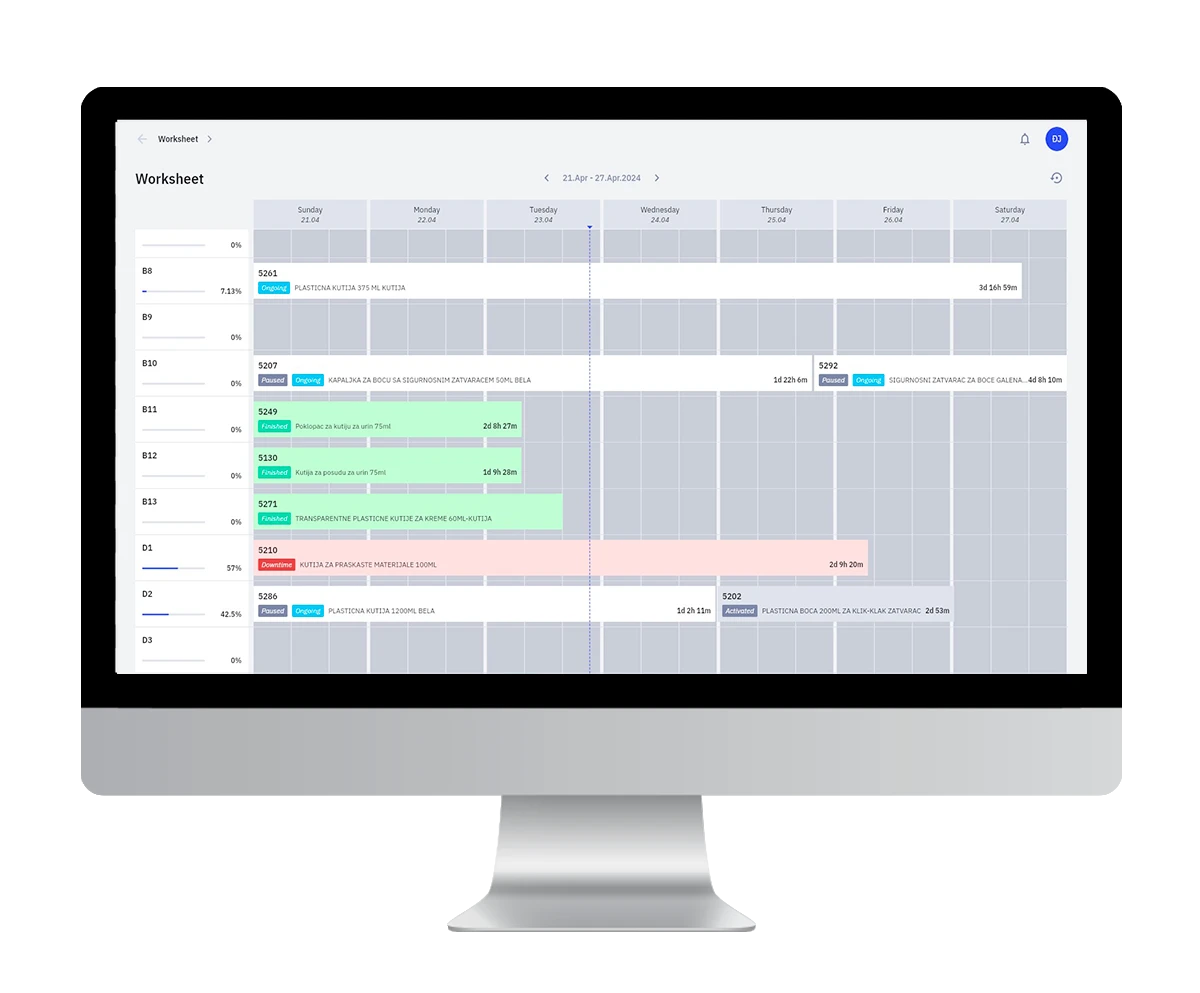
Monitoring and Planning
DigiPro real-time production monitoring and planning view
Monitoring and Planning Together

Planning sits next to live execution, so the schedule is adjusted against what the floor is actually doing rather than what it was supposed to do.

Four questions that stop requiring a phone call

These are the ones that normally take a walk to the floor, a call to a shift supervisor, or a wait until the end of the month. Each of them is now a screen.

Where is order 4128 right now?
Live order list, with completion and expected finish
Why did last week run behind?
Downtime records showing which machine lost the hours
Which shift is actually more productive?
Operator efficiency, measured the same way for everyone
Can we take on this order this month?
Planning view against real capacity, not assumed capacity
Knowledge Base

When Your Best Operator Is Off,
the Line Should Not Slow Down

Most production knowledge is undocumented. It lives with a handful of experienced people, and it walks out of the building with them. DigiPro puts it back where the work happens.

Instructions attached to the order, not filed somewhere

A manual in a binder gets read once. A procedure on a shared drive gets found by the people who already know it exists. DigiPro takes a different route: the guidance an operator needs is tied to the work order in front of them, available in the app at the moment they need it.

When something stops, they do not wait for the one person who knows the fix. They open the order, find the relevant instruction or video, and keep going.

That is the whole point. The knowledge base is available to employees at any time, which is what lets stoppages get resolved quickly and independently instead of turning into queues.
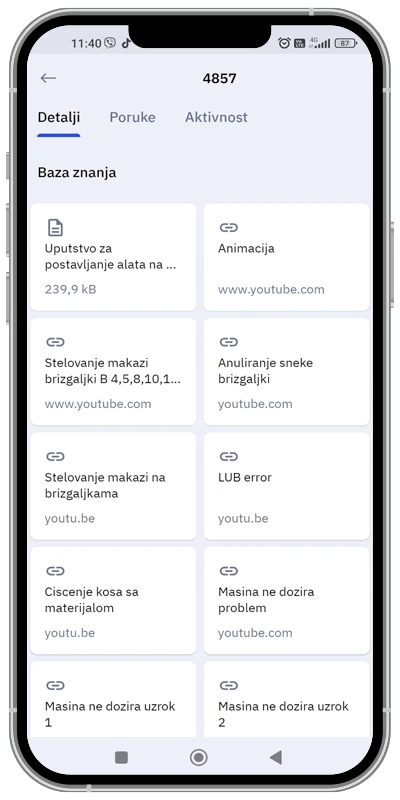
Knowledge tied to the specific work order
Not a general library, but the material relevant to this job
Tool setup instructions
Step by step guidance for getting the machine ready correctly
Video guidance for the task at hand
Recordings that show the work, which beats a written description
DigiPro mobile app knowledge base attached to a work order
Available at any time
No waiting for a supervisor
Text and video
Whatever explains it fastest

What it changes beyond the shift

Documented, accessible knowledge is not a training nicety. It is what determines whether your process improvements survive the people who introduced them.

The company owns the knowledge

Procedures and experience move out of individual heads and into a system the business controls. Processes stop depending on specific people being present.

Lean and Kaizen land without resistance

Continuous improvement usually stalls because the new method never reaches the floor. When knowledge is accessible to everyone, a change to the standard actually becomes the standard.

LEAN KAIZEN STANDARD WORK

New hires become productive faster

Onboarding stops being a matter of shadowing whoever is free. The instructions are already in the app, which shortens the ramp and reduces the load on senior operators.

What Changes

Six Things That Look Different
Depending on Where You Sit

A production system is only adopted if it makes sense to the people using it. Here is what DigiPro changes for each of the three groups who have to live with it.

On the Line
For the Operator
01

Work arrives instead of being chased

The system assigns orders to operators who are free and notifies them when a machine stops. Nobody stands around waiting to be told what to do next, and nobody walks across the plant to ask.

Significant reduction in unproductive time
02

Effort is measured, so it can be recognized

Accurate performance measurement makes it possible to pay people according to real output. The operator who consistently produces more is no longer relying on someone noticing.

Fair compensation based on actual performance
Running the Plant
For the Production Manager
03

The plan adjusts itself to reality

Work orders are automatically adjusted to conditions in production, taking into account both planned and unplanned stoppages. The schedule stops being a document that was accurate at eight in the morning.

Real-time work order updates
04

Any period, reported immediately

Complete insight into production results, work efficiency, and the time spent resolving problems, available for any time period without waiting for someone to compile it.

Instant reports, no month-end wait
Owning the Business
For the Owner
05

Control without adding supervisors

Digital monitoring and process automation reduce the need for a large number of managers, while control and quality of work stay in place. Growth stops automatically adding a management layer.

Fewer shift supervisors, same oversight
06

The business stops depending on individuals

The company becomes the owner of its knowledge and its processes. Training new employees gets faster and simpler, and improvement initiatives survive the people who introduced them.

Knowledge and process owned by the company

All six rest on the same thing

None of this requires anyone to fill in a form, submit a report, or remember to log something at the end of the shift. The record is created by the work itself, through a wireless device on a machine you already own. That is why it holds up over time instead of quietly falling out of use.

Retrofit and Investment

The Two Questions Everyone Asks
Before They Ask Anything Else

Will it work on our machines, and what does it cost. Both have straightforward answers, so here they are before the proposal stage.

It runs on the machines you already own

Most production monitoring projects stall at the same point. The systems being evaluated expect machines that can report on themselves, and a real factory floor is rarely built that way. It is a mix of ages, makes, and generations, and half of it predates the idea of a machine having a data output at all.

DigiPro sidesteps that entirely. A small wireless device attaches to a moving part of the machine, and that is the connection. There is no controller integration project, no wiring, and no adaptation of the machine itself.

The practical consequence: the age of your machine park stops being the reason you cannot measure it.

Fully Wireless

No cabling to run and no network points to add at the machine.

No Machine Modification

The machine is not opened, rewired, or altered in any way.

Mounted in Minutes

Quick installation, with no waiting for a production window.

Mixed Machine Parks

Old and new machines are measured the same way, side by side.

A transparent structure, sized to your plant

There is no fixed package to fit into. The offer is built from two variables, and the payment structure is the same regardless of how large the deployment is.

Variable One
Number of machines
Variable Two
Number of user accounts
Step One
One-Time Installation
Mounting the hardware on the machines, connecting them to the system, and creating the user accounts.
Ongoing
Monthly Subscription
A recurring licence formed after installation, scaled to the machines and users in your deployment.
Optional
15%
Annual Payment Discount
Applied when the annual licence is settled in a single payment instead of monthly.

Three steps from first conversation to a working system

Nothing is quoted before the plant is understood, and nothing is installed before the offer is accepted.

1

Needs Analysis, at No Cost

A review of how many machines would be covered, how many user accounts are needed, and what is specific about your processes and work orders.

2

Offer and Contract

A proposal built from that analysis, with the contract prepared and delivered on the back of it rather than after weeks of back and forth.

3

Installation and Onboarding

Devices mounted, software configured, accounts opened, and the team walked through the system so it is used properly from the first shift.

Want to know what this would look like for your plant?

Tell us how many machines you run and we will start from there.

Request a Free Analysis
Why SynapTech

Mounting the Device Takes Minutes.
Getting Value From It Takes a Partner.

SynapTech is the authorized partner, official distributor, and implementation partner for DigiPro System. One contract, one project team, and one point of accountability from the first plant visit through long term support.

The hardware side is genuinely simple. The part that decides whether the project succeeds is everything around it: which machines to cover first, how work orders should be structured, what goes into the knowledge base, and how the shift supervisors change the way they work once the data arrives.

1
Plant Analysis Machine count, user accounts, work order structure, and which processes to measure first
2
Solution Design Rollout scope, order and stoppage definitions, roles and permissions, and the knowledge base plan
3
Installation and Configuration Devices mounted, machines connected, software configured, and accounts opened for every role
4
Onboarding and Managed Services The team walked through the system, then ongoing support as you extend it to more machines
Authorized Partner
Official Distributor
Implementation Partner
3
Partnership RolesAuthorized, Distributor, Implementation
30+
Years of ManufacturingBehind the product itself
4
Steps to Go LiveDevice, software, app, onboarding
E2E
Full LifecycleConsulting through managed services
FAQ

Production Monitoring,
Answered Plainly

The questions production managers and plant owners ask us before a DigiPro project starts.

DigiPro System is a manufacturing execution system for real-time production monitoring. A small wireless device attaches to a moving part of each machine, and from that point the system tracks work order execution, machine stoppages, and operator activity, and makes it all visible on a phone or a desktop.

It is built for production companies that have outgrown spreadsheets and end of month reports but do not want a multi-year enterprise project. The usual profile is a plant where output varies between shifts, where reports arrive too late to act on, and where critical know-how sits with a few experienced people.

It was developed by a family manufacturing company running its own facility for over thirty years, which is why the design reflects how a plant actually works rather than how software vendors imagine it does.

This is the question that stops most production monitoring projects, and it is the one DigiPro was designed around. The device does not read data from the machine. It measures the machine's movement.

Installation is quick and requires no additional adaptation of the system. The device is wireless, and it attaches directly to a moving part. Nothing is opened, rewired, or modified, which means the age and make of a machine stop being the deciding factor.

In practice this matters most in plants with a mixed machine park, where new equipment could report on itself but the older half could not. With DigiPro both halves are measured the same way and appear in the same reports.

Worth being specific about, because production software is often described in terms broad enough to mean anything. DigiPro records:

  • Execution time for every work order, from start to completion
  • Every machine stoppage, including how long it lasted
  • Work orders related to tool replacement, tracked as part of the flow rather than as untracked interruptions
  • Activity per operator, which is what produces the efficiency comparison between people and between shifts
  • Live status of active work orders, active operators, and active machines

From those records the system produces reports for any period you select, immediately. If you have a specific metric you need to see, raise it during the analysis and we will tell you plainly whether the system delivers it.

Through four mechanisms, none of which depend on people working harder.

  • Less waiting. Orders are assigned automatically to operators who are free, so nobody stands idle waiting to be told what to do next.
  • Faster response to stoppages. The operator is notified when a machine stops, and the knowledge base gives them what they need to resolve it without waiting for a specialist.
  • Visible differences between shifts. When output is measured identically for everyone, the gap between the strongest and weakest shift becomes a specific number you can work on.
  • Realistic scheduling. Work orders adjust to actual conditions, including unplanned stoppages, so the plan stops being a document that was accurate at the start of the day.

It is a fair question and it deserves a direct answer rather than a reassuring one. Yes, the system measures individual output. That is not a side effect, it is one of its core functions.

What matters is what the measurement is used for. Accurate performance data is what makes it possible to reward people according to what they actually produce rather than according to who is most visible when a manager walks past. Operators who consistently do more usually want that recorded.

The system also gives back. The knowledge base means an operator can solve a problem on their own instead of waiting and being blamed for the delay. Automatic order assignment removes the dead time they were never responsible for in the first place.

In practice, adoption depends on how the change is introduced. That is part of what SynapTech works through with you during onboarding, because a system the floor resents is a system that quietly stops being used.

No. The operator side of the system is an app that opens on the work order they are currently running, showing the target quantity, how far along it is, and the machine, tool, and product involved. There is nothing to configure and nothing to fill in.

The system does the coordination work itself. It assigns orders, records execution times, logs stoppages, and notifies the right person. What the operator contributes is the work, not the data entry.

For management and administrator roles, onboarding is included as the fourth step of implementation. Our team walks the relevant people through the system so it keeps producing results long after go-live.

DigiPro runs as a standalone system, which is deliberate. It does not require an existing ERP or MES to be useful, and a plant with no production software at all can start with it directly.

Where you do run an ERP or planning system, the question is which data should move between them and in which direction. That varies enough between installations that a blanket answer would be misleading, so we assess it specifically: bring your current systems to the free analysis and we will tell you what is feasible, what it would involve, and whether it is worth doing in the first phase or later.

A useful point of reference: many plants run DigiPro on the shop floor and leave orders, invoicing, and finance exactly where they are.

The offer is flexible and built from two variables: the number of machines and the number of user accounts. There is no fixed package to fit into.

The structure works in two parts:

  • A one-time installation, covering hardware mounting on the machines, connecting them to the system, and opening user accounts
  • A monthly subscription, formed after installation and scaled to your deployment

A 15% discount applies when the annual licence is paid in a single payment rather than monthly. Because pricing depends on your machine count, the figure comes after the free analysis rather than before it.

Considerably less than a conventional MES project, because the hardware step is genuinely quick. Mounting a wireless device on a moving part takes minutes per machine and does not require stopping production for a rewiring window.

The timeline is driven by scope rather than by technical difficulty:

  • How many machines are covered in the first phase
  • How many user accounts and roles need to be set up
  • How your work orders are structured and what counts as a stoppage in your process
  • How much material goes into the knowledge base at the start

We give a committed schedule after the analysis, because a date quoted before we have seen the plant is a guess. Many customers start with a limited set of machines, confirm the data is telling them something useful, and extend from there.

Three steps, and the first one costs nothing.

  • Free analysis. We review how many machines would be covered, how many user accounts are needed, and what is specific about your processes and work orders.
  • Offer and contract. A proposal built from that analysis, with the contract prepared on the back of it.
  • Installation and onboarding. Devices mounted, software configured, accounts opened, and the team walked through the system.

The most useful thing you can bring to the first conversation is not a specification. It is the question you currently cannot answer about your own production, whether that is where an order stands, why last month ran behind, or which shift is genuinely more productive. Start there.

Still have a question about your plant?

Send us the specifics and we will answer against your machines, not a generic setup.

Ask an Expert

What Can You Not Answer
About Your Own Production?

Where an order stands right now. Why last month ran behind. Which shift is genuinely more productive. Start with the question that bothers you most, and we will show you what the data would look like on your machines.

1 Free analysis
2 Offer and contract
3 Installation and onboarding
Authorized Partner
Official Distributor
Implementation Partner